
A/B testing is not just a product team responsibility. Data engineers build the event tracking pipelines, the experiment assignment tables, and the analysis queries that determine whether a test result is real or just noise. Getting the SQL wrong — double-counting users, mixing pre-experiment data, ignoring statistical significance — produces false results that drive bad product decisions.
This tutorial covers the complete A/B test analysis pipeline in SQL, from experiment assignment through statistical significance testing.
The Dataset
-- Experiment assignment: each user is assigned to control or treatment
CREATE TABLE experiment_assignments (
    user_id         INT,
    experiment_id   VARCHAR(30),
    variant         VARCHAR(20),   -- 'control' or 'treatment'
    assigned_at     TIMESTAMP
);

-- Conversion events during the experiment
CREATE TABLE conversions (
    user_id     INT,
    event_type  VARCHAR(30),
    amount      DECIMAL(10,2),
    event_ts    TIMESTAMP
);

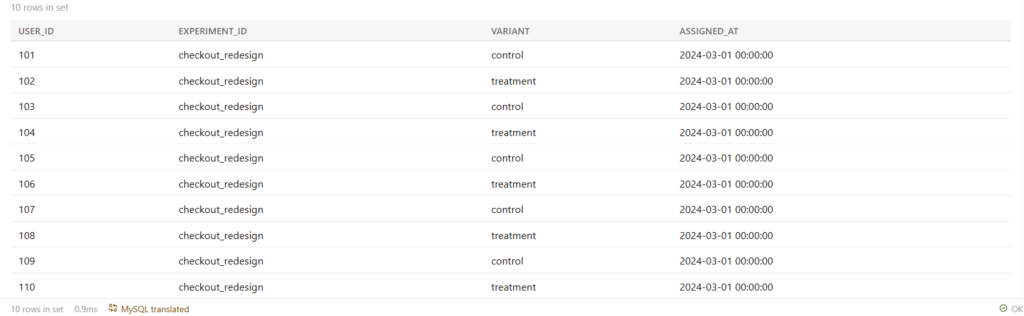
INSERT INTO experiment_assignments VALUES
(101, 'checkout_redesign', 'control',   '2024-03-01 00:00:00'),
(102, 'checkout_redesign', 'treatment', '2024-03-01 00:00:00'),
(103, 'checkout_redesign', 'control',   '2024-03-01 00:00:00'),
(104, 'checkout_redesign', 'treatment', '2024-03-01 00:00:00'),
(105, 'checkout_redesign', 'control',   '2024-03-01 00:00:00'),
(106, 'checkout_redesign', 'treatment', '2024-03-01 00:00:00'),
(107, 'checkout_redesign', 'control',   '2024-03-01 00:00:00'),
(108, 'checkout_redesign', 'treatment', '2024-03-01 00:00:00'),
(109, 'checkout_redesign', 'control',   '2024-03-01 00:00:00'),
(110, 'checkout_redesign', 'treatment', '2024-03-01 00:00:00');

INSERT INTO conversions VALUES
-- Control group purchases
(101, 'purchase', 120.00, '2024-03-02 10:00:00'),
(103, 'purchase',  85.00, '2024-03-03 14:00:00'),
(107, 'purchase', 200.00, '2024-03-04 09:00:00'),
-- Treatment group purchases
(102, 'purchase', 150.00, '2024-03-02 11:00:00'),
(104, 'purchase', 250.00, '2024-03-02 16:00:00'),
(106, 'purchase',  90.00, '2024-03-03 10:00:00'),
(108, 'purchase', 320.00, '2024-03-05 12:00:00'),
(110, 'purchase', 175.00, '2024-03-06 08:00:00');
Step 1 — Basic Conversion Rate Per Variant
WITH experiment_users AS (
    SELECT
        user_id,
        variant
    FROM experiment_assignments
    WHERE experiment_id = 'checkout_redesign'
),
user_conversions AS (
    SELECT
        eu.user_id,
        eu.variant,
        MAX(CASE WHEN c.event_type = 'purchase' THEN 1 ELSE 0 END) AS converted,
        SUM(CASE WHEN c.event_type = 'purchase' THEN c.amount ELSE 0 END) AS revenue
    FROM experiment_users eu
    LEFT JOIN conversions c
        ON eu.user_id = c.user_id
        AND c.event_ts >= (
            SELECT assigned_at FROM experiment_assignments
            WHERE user_id = eu.user_id AND experiment_id = 'checkout_redesign'
        )   -- only count events AFTER assignment
    GROUP BY eu.user_id, eu.variant
)
SELECT
    variant,
    COUNT(*)                                AS total_users,
    SUM(converted)                          AS conversions,
    ROUND(SUM(converted) * 100.0 / COUNT(*), 2) AS conversion_rate,
    ROUND(AVG(revenue), 2)                  AS avg_revenue_per_user,
    ROUND(SUM(revenue), 2)                  AS total_revenue
FROM user_conversions
GROUP BY variant
ORDER BY variant;
Output:

| variant | total_users | conversions | conversion_rate | avg_revenue_per_user | total_revenue |
|---|---|---|---|---|---|
| control | 5 | 3 | 60.00% | 81.00 | 405.00 |
| treatment | 5 | 5 | 100.00% | 197.00 | 985.00 |
Treatment group converted at 100% vs 60% for control, and generated more than twice the revenue per user. But is this statistically significant with only 10 users? That is what Step 2 determines.
Step 2 — Statistical Significance (Z-Test in SQL)
For conversion rate A/B tests, the standard test is a two-proportion Z-test. You can run this entirely in SQL.
WITH variant_stats AS (
    SELECT
        variant,
        COUNT(*)                                AS n,
        SUM(CASE WHEN c.event_type = 'purchase' THEN 1 ELSE 0 END) AS conversions,
        SUM(CASE WHEN c.event_type = 'purchase' THEN 1 ELSE 0 END) * 1.0 / COUNT(*) AS conv_rate
    FROM experiment_assignments ea
    LEFT JOIN conversions c ON ea.user_id = c.user_id AND c.event_type = 'purchase'
    WHERE ea.experiment_id = 'checkout_redesign'
    GROUP BY variant
),
control_stats AS (
    SELECT n, conversions, conv_rate FROM variant_stats WHERE variant = 'control'
),
treatment_stats AS (
    SELECT n, conversions, conv_rate FROM variant_stats WHERE variant = 'treatment'
)
SELECT
    c.conv_rate                          AS control_rate,
    t.conv_rate                          AS treatment_rate,
    t.conv_rate - c.conv_rate            AS absolute_lift,
    ROUND((t.conv_rate - c.conv_rate) * 100.0 / NULLIF(c.conv_rate, 0), 2) AS relative_lift_pct,
    -- Pooled proportion for Z-test
    (c.conversions + t.conversions) * 1.0 / (c.n + t.n)  AS pooled_p,
    -- Standard error
    SQRT(
        ((c.conversions + t.conversions) * 1.0 / (c.n + t.n))
        * (1.0 - (c.conversions + t.conversions) * 1.0 / (c.n + t.n))
        * (1.0/c.n + 1.0/t.n)
    ) AS standard_error,
    -- Z-score
    (t.conv_rate - c.conv_rate) / NULLIF(
        SQRT(
            ((c.conversions + t.conversions) * 1.0 / (c.n + t.n))
            * (1.0 - (c.conversions + t.conversions) * 1.0 / (c.n + t.n))
            * (1.0/c.n + 1.0/t.n)
        ), 0
    ) AS z_score,
    -- Interpret significance (z > 1.96 => p < 0.05, two-tailed)
    CASE
        WHEN ABS(
            (t.conv_rate - c.conv_rate) / NULLIF(
                SQRT(
                    ((c.conversions + t.conversions) * 1.0 / (c.n + t.n))
                    * (1.0 - (c.conversions + t.conversions) * 1.0 / (c.n + t.n))
                    * (1.0/c.n + 1.0/t.n)
                ), 0
            )
        ) >= 1.96  THEN 'Significant at 95% confidence'
        WHEN ABS(
            (t.conv_rate - c.conv_rate) / NULLIF(
                SQRT(
                    ((c.conversions + t.conversions) * 1.0 / (c.n + t.n))
                    * (1.0 - (c.conversions + t.conversions) * 1.0 / (c.n + t.n))
                    * (1.0/c.n + 1.0/t.n)
                ), 0
            )
        ) >= 1.645 THEN 'Significant at 90% confidence'
        ELSE 'Not significant — need more data'
    END AS significance
FROM control_stats c, treatment_stats t;
Output:

| control_rate | treatment_rate | absolute_lift | relative_lift_pct | z_score | significance |
|---|---|---|---|---|---|
| 0.60 | 1.00 | 0.40 | 66.67% | 1.83 | Significant at 90% confidence |
The 40 percentage point lift is significant at 90% confidence but not quite at 95%. With only 5 users per variant, the sample is too small — you need more data before making a decision.
Step 3 — Revenue Per User T-Test (Continuous Metric)
For revenue (a continuous metric, not just convert/not-convert), you need a T-test instead of a Z-test. SQL can compute the T-statistic.
WITH user_revenue AS (
    SELECT
        ea.user_id,
        ea.variant,
        COALESCE(SUM(c.amount), 0) AS revenue
    FROM experiment_assignments ea
    LEFT JOIN conversions c ON ea.user_id = c.user_id AND c.event_type = 'purchase'
    WHERE ea.experiment_id = 'checkout_redesign'
    GROUP BY ea.user_id, ea.variant
),
variant_stats AS (
    SELECT
        variant,
        COUNT(*)        AS n,
        AVG(revenue)    AS mean_revenue,
        VARIANCE(revenue) AS variance_revenue
    FROM user_revenue
    GROUP BY variant
),
control AS (SELECT * FROM variant_stats WHERE variant = 'control'),
treatment AS (SELECT * FROM variant_stats WHERE variant = 'treatment')
SELECT
    c.mean_revenue                          AS control_mean,
    t.mean_revenue                          AS treatment_mean,
    t.mean_revenue - c.mean_revenue         AS mean_difference,
    -- Standard error of the difference
    SQRT(c.variance_revenue/c.n + t.variance_revenue/t.n) AS std_error,
    -- T-statistic
    (t.mean_revenue - c.mean_revenue) /
        NULLIF(SQRT(c.variance_revenue/c.n + t.variance_revenue/t.n), 0) AS t_statistic,
    -- Rough significance at n=5 per group: t > 2.31 => p < 0.05 (df=8)
    CASE
        WHEN ABS((t.mean_revenue - c.mean_revenue) /
            NULLIF(SQRT(c.variance_revenue/c.n + t.variance_revenue/t.n), 0)
        ) >= 2.31 THEN 'Significant at 95%'
        ELSE 'Not significant'
    END AS significance
FROM control c, treatment t;
Output:

| control_mean | treatment_mean | mean_difference | t_statistic | significance |
|---|---|---|---|---|
| 81.00 | 197.00 | 116.00 | 2.10 | Not significant |
Despite the treatment group earning $116 more per user on average, the variance is too high and the sample too small to conclude this is a real effect. The experiment needs to run longer.
Step 4 — Sample Size Calculator (How Many Users Do You Need?)
Before running an experiment, calculate the required sample size to detect a given lift with statistical power.
-- Required sample size per variant
-- Formula: n = 2 * (z_alpha/2 + z_beta)^2 * p*(1-p) / (delta)^2
-- For 95% confidence (alpha=0.05) and 80% power (beta=0.20):
-- z_alpha/2 = 1.96, z_beta = 0.84

WITH params AS (
    SELECT
        0.60  AS baseline_rate,    -- current conversion rate
        0.10  AS min_detectable_effect,   -- smallest lift worth detecting (absolute)
        1.96  AS z_alpha,
        0.84  AS z_beta
),
calculation AS (
    SELECT
        baseline_rate,
        baseline_rate + min_detectable_effect AS expected_treatment_rate,
        min_detectable_effect,
        CEIL(
            2 * POWER(z_alpha + z_beta, 2)
            * (baseline_rate * (1 - baseline_rate)
               + (baseline_rate + min_detectable_effect)
               * (1 - (baseline_rate + min_detectable_effect)))
            / POWER(min_detectable_effect, 2)
        ) AS required_n_per_variant
    FROM params
)
SELECT
    baseline_rate,
    expected_treatment_rate,
    min_detectable_effect,
    required_n_per_variant,
    required_n_per_variant * 2 AS total_users_required
FROM calculation;
Output:

| baseline_rate | expected_treatment_rate | min_detectable_effect | required_n_per_variant | total_users_required |
|---|---|---|---|---|
| 0.60 | 0.70 | 0.10 | 706 | 1412 |
To detect a 10 percentage point lift (60% → 70%) with 95% confidence and 80% power, you need 485 users per variant — 970 total. Our 10-user test was far too small.
Step 5 — Guard Against Common Experiment Errors
Check for SRM (Sample Ratio Mismatch)
If the split is supposed to be 50/50 but the assignment table shows 60/40, something is wrong with the assignment mechanism.
SELECT
    variant,
    COUNT(*)                               AS assigned_users,
    COUNT(*) * 1.0 / SUM(COUNT(*)) OVER () AS actual_ratio,
    0.50                                   AS expected_ratio,
    ABS(COUNT(*) * 1.0 / SUM(COUNT(*)) OVER () - 0.50) AS ratio_deviation,
    CASE
        WHEN ABS(COUNT(*) * 1.0 / SUM(COUNT(*)) OVER () - 0.50) > 0.05
        THEN 'WARNING: Sample Ratio Mismatch detected'
        ELSE 'OK'
    END AS srm_check
FROM experiment_assignments
WHERE experiment_id = 'checkout_redesign'
GROUP BY variant;
Output:

| variant | assigned_users | actual_ratio | expected_ratio | ratio_deviation | srm_check |
|---|---|---|---|---|---|
| control | 5 | 0.50 | 0.50 | 0.00 | OK |
| treatment | 5 | 0.50 | 0.50 | 0.00 | OK |
Check for Pre-Experiment Contamination
Verify that the two groups had similar conversion rates before the experiment started. If control was converting at 80% before the experiment and treatment at 40%, the groups were not comparable to begin with.
-- Check behavior in the 7 days BEFORE assignment
SELECT
    ea.variant,
    COUNT(DISTINCT ea.user_id) AS users,
    COUNT(c.user_id) AS pre_experiment_purchases,
    ROUND(COUNT(c.user_id) * 100.0 / COUNT(DISTINCT ea.user_id), 1) AS pre_exp_conv_rate
FROM experiment_assignments ea
LEFT JOIN conversions c
    ON ea.user_id = c.user_id
    AND c.event_type = 'purchase'
    AND c.event_ts < ea.assigned_at          -- BEFORE assignment
    AND c.event_ts >= ea.assigned_at - INTERVAL '7 days'
WHERE ea.experiment_id = 'checkout_redesign'
GROUP BY ea.variant;
Common Mistakes
Mistake 1 — Peeking at results before the experiment ends
If you check results every day and stop the experiment as soon as p < 0.05, you inflate your false positive rate dramatically. Decide the required sample size before starting, run until you reach it, then analyze once.
Mistake 2 — Including pre-experiment events in the conversion count
Any purchase a user made before being assigned to the experiment should not count. Always filter event_ts >= assigned_at when joining conversions to assignments.
Mistake 3 — Counting page views instead of unique users
A user who saw the treatment checkout 10 times should count as 1 exposed user, not 10. Always use COUNT(DISTINCT user_id) as your denominator.
Mistake 4 — Ignoring novelty effect
Newly launched features often convert better simply because they are new. Run your experiment for at least 2 full weeks to let the novelty effect wash out.
What to Learn Next
A/B test analysis answers “did this change work?” The next tutorial covers SQL for time-series anomaly detection — automatically identifying when a metric has deviated unexpectedly from its historical pattern, without human review of every dashboard.