
Change Data Capture or CDC refers to the process of identifying and capturing changes made to data in the data source and then delivering those changes to the target.
Those changes could be obviously new records to be inserted from the source to the target. Updated records in the source that need to be reflected in the target. Or deleted records in the source that must be deleted in the target.
Changes are logged at the source as events that contain both the data of the records along with metadata information. These metadata indicate whether the specified record was inserted, updated or deleted.
In addition to a version number or timestamp indicating the order in which changes happened.
Here is an example of CDC events need to be applied on our target table.
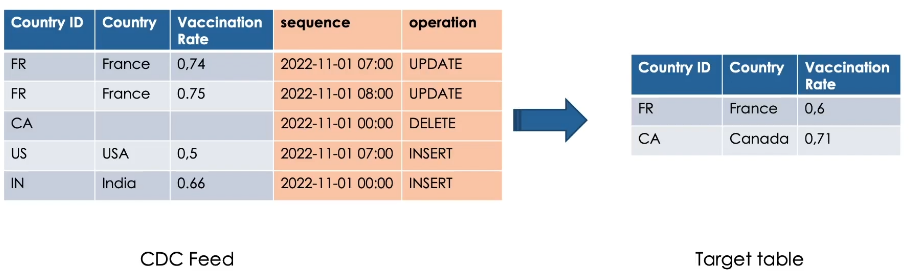
Notice here, France, for example, has two records, so we need to apply the most recent change.
Canada needs to be deleted. So we don’t need to send all the data of the record.
Lastly, USA and India are new records need to be inserted.
Here we see the changes applied on our target table.
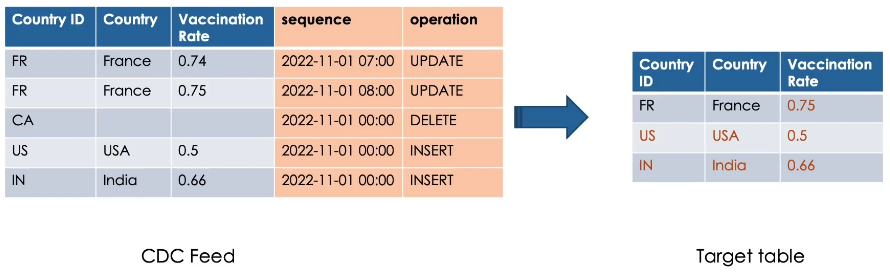
We don’t see the record of Canada as it has been deleted.
Such a CDC feed could be received from the source as a data stream or simply in JSON files, for example.
In Delta Lake, you can process CDC feed using the MERGE INTO command.
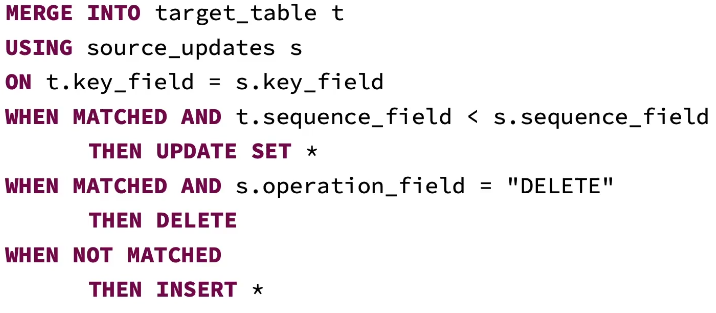
Remember, MERGE INTO command allows you to merge a set of updates, insertions and deletions based on a source table into a target delta table.
However, Merge operations cannot be performed if multiple source rows matched and attempted to modify the same target row in the delta table.
So if your CDC feed has multiple updates for the same key, like in our France example previously, this will generate an exception.
To avoid this error, you need to ensure that you are merging only the most recent changes.
This can be achieved using the rank window function.
rank().over(window)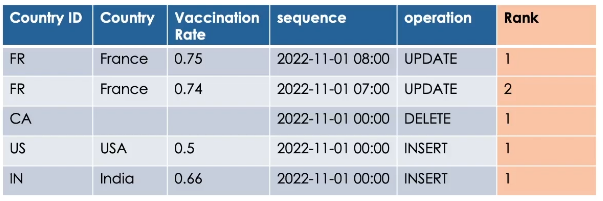
This ranking function assigns a rank number for each row within a window.
What is Window?
A window is a group of records having the same partitioning key, and sorted by an ordering column in descending order.
So the most recent record for each key will have the rank 1.
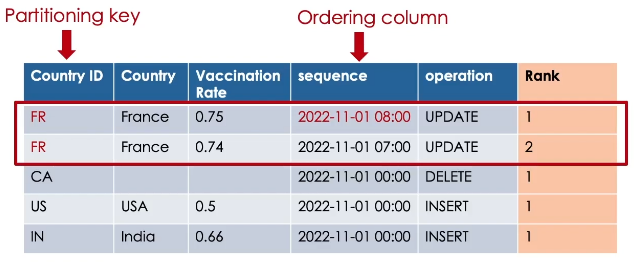
Now we can filter to keep only records having rank equal 1 and merge them into our target table using MERGE INTO command.
Hands On: CDC Feed
We are going to process, Change Data Capture or CDC.
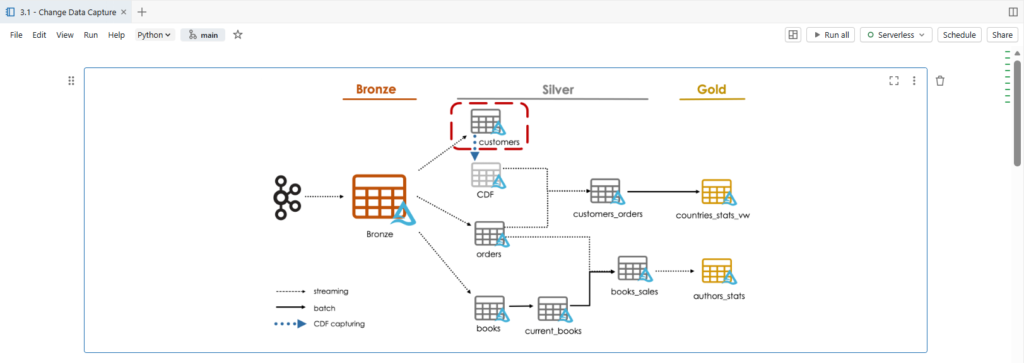
We will create our customers silver table.
The data in the customers topic contains complete row output from a Change Data Capture feed. The changes captured are either insert, update or delete.
Let us take a look on our customers data.
from pyspark.sql import functions as F

schema = "customer_id STRING, email STRING, first_name STRING, last_name STRING, gender STRING, street STRING, city STRING, country_code STRING, row_status STRING, row_time timestamp"

customers_df = (spark.table("bronze")
                 .filter("topic = 'customers'")
                 .select(F.from_json(F.col("value").cast("string"), schema).alias("v"))
                 .select("v.*")
                 .filter(F.col("row_status").isin(["insert", "update"])))

display(customers_df)
Here as before we filter for the customers topic.
.filter(“topic = ‘customers'”)
Unpack all the JSON fields from the value column into the correct schema.
In addition, we will process only insert and update in this notebook.
.filter(F.col(“row_status”).isin([“insert”, “update”])))
While we will demonstrate different approaches for processing delete requests in latter.
Here we see the customer ID, email, first and last name, gender, and the address information: Street, City and Country Code.
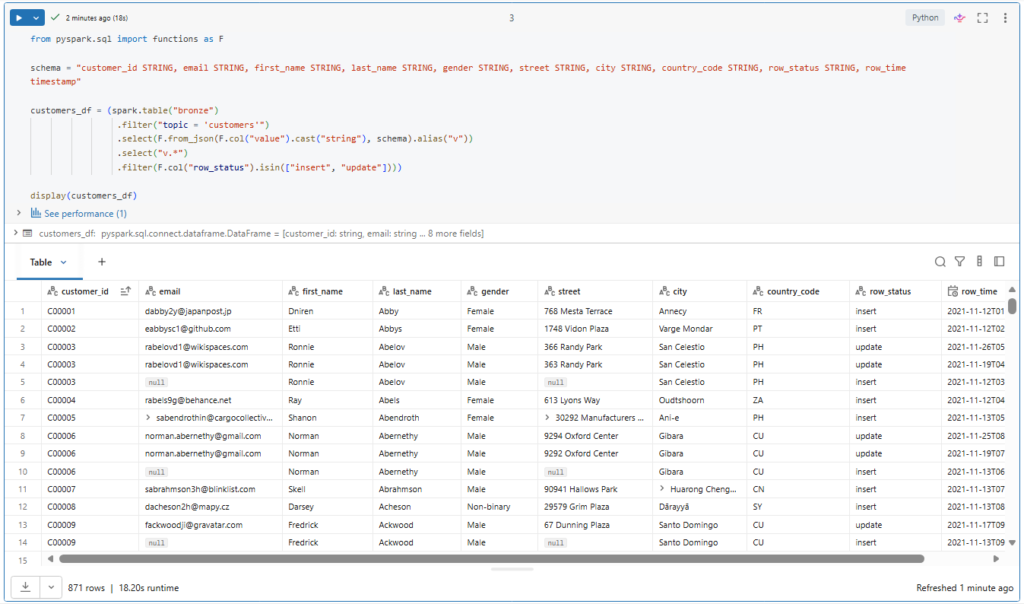
In addition, we have the fields: row status and row time.
As you can see, both insert and update records contain all the fields we need for our customers table.
Multiple updates could be received for the same record, but with different row time.
Here we see the customer with ID C00003 has new updated records with a modified street address.
In such a case, we need to ensure applying the most recent change into our target table.
We have previously explored dropDuplicates function to remove exact duplicates.
However, here the problem is different since records are not identical for the same primary key.
The solution to keep only the most recent change is to use the rank window function.
from pyspark.sql.window import Window

window = Window.partitionBy("customer_id").orderBy(F.col("row_time").desc())

ranked_df = (customers_df.withColumn("rank", F.rank().over(window))
                          .filter("rank == 1")
                          .drop("rank"))
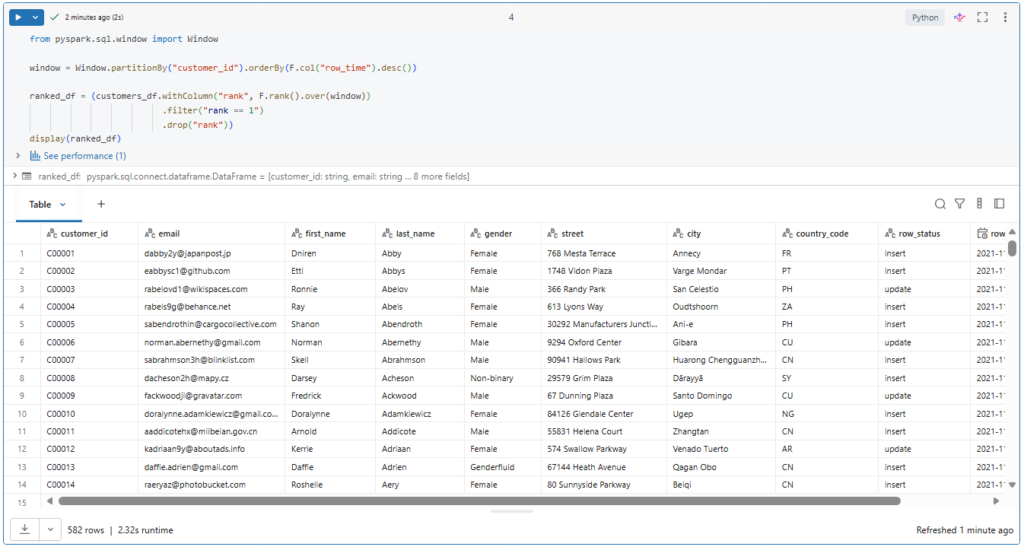
display(ranked_df)
This ranking function assigns a rank number for each row within a window.
A window is a group of ordered records having the same partition key. In our case the customer ID. And we sort the records within our window by the row time in descending order.
So the most recent record for each customer ID will have the rank 1.
.filter(“rank == 1”)
Now we can filter to keep only records having rank equal 1 and drop the rank column as it is no more needed.
.drop(“rank”))
Let’s run this.
Great! As desired, We got only the newest entry for each unique customer ID.
Let us try to apply this logic to a streaming read.
# This will throw an exception because non-time-based window operations are not supported on streaming DataFrames.
ranked_df = (spark.readStream
                   .table("bronze")
                   .filter("topic = 'customers'")
                   .select(F.from_json(F.col("value").cast("string"), schema).alias("v"))
                   .select("v.*")
                   .filter(F.col("row_status").isin(["insert", "update"]))
                   .withColumn("rank", F.rank().over(window))
                   .filter("rank == 1")
                   .drop("rank")
             )

(ranked_df.writeStream
            .option("checkpointLocation", f"{bookstore.checkpoint_path}/ranked")
            .trigger(availableNow=True)
            .format("console")
            .start()
)
Interesting.
As you can see, such a window operation is not supported on streaming data frames.
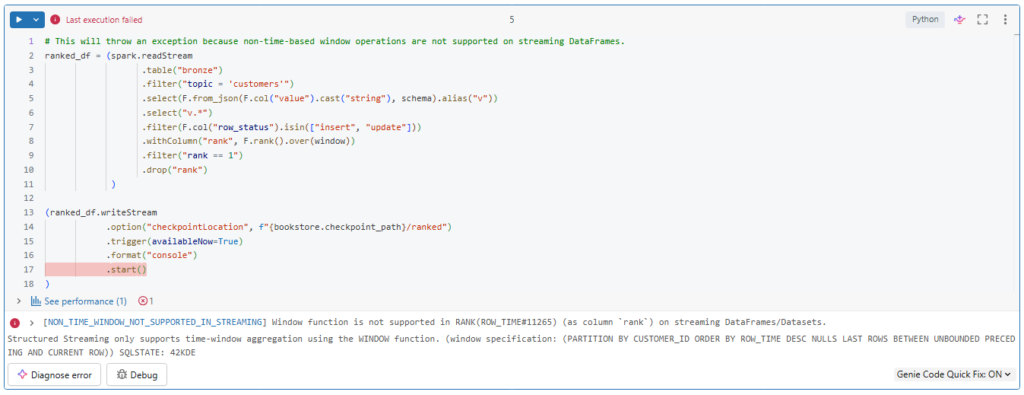
To avoid this restriction we can use foreachBatch logic.
from pyspark.sql.window import Window

def batch_upsert(microBatchDF, batchId):
    window = Window.partitionBy("customer_id").orderBy(F.col("row_time").desc())

    (microBatchDF.filter(F.col("row_status").isin(["insert", "update"]))
                 .withColumn("rank", F.rank().over(window))
                 .filter("rank == 1")
                 .drop("rank")
                 .createOrReplaceTempView("ranked_updates"))

    query = """
        MERGE INTO customers_silver c
        USING ranked_updates r
        ON c.customer_id=r.customer_id
            WHEN MATCHED AND c.row_time < r.row_time
              THEN UPDATE SET *
            WHEN NOT MATCHED
              THEN INSERT *
    """

    microBatchDF.sparkSession.sql(query)
Inside the streaming micro batch process, we can interact with our data using batch syntax instead of streaming syntax.
So here we simply process the records of each batch before merging them into the target table.
We start by computing the newest entries based on our window.
And we store them in a temporary view called ranked_updates.
Next we merge these ranked updates into our customer table based on the customer ID key.
If the key already exists in the table, we update the record.
And if the key does not exist, we insert the new record.
If we were interested by applying delete changes also.
We could simply add another condition for this in our merge statement.
Let us create the function by running the cell.
Now let us create our customers target table.
%sql
CREATE TABLE IF NOT EXISTS customers_silver
(customer_id STRING, email STRING, first_name STRING, last_name STRING, gender STRING, street STRING, city STRING, country STRING, row_time TIMESTAMP)
Notice here that we are adding country name instead of the country code received in our customers data.
For this we will perform a join with a country lookup table.
df_country_lookup = spark.read.json(f"{bookstore.dataset_path}/country_lookup")
display(df_country_lookup)
Let us take a look on this lookup table.
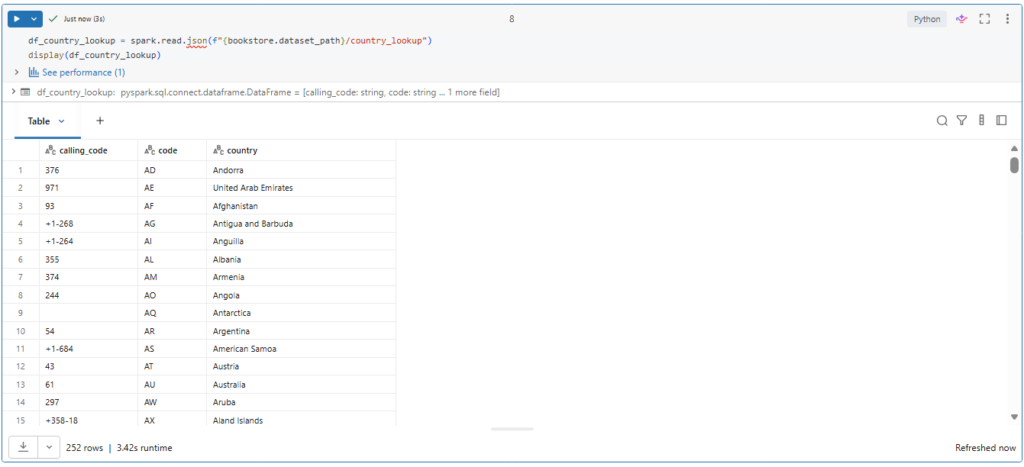
So it mainly contained the country code and the country name.
Now we can write our streaming query.
query = (spark.readStream
                  .table("bronze")
                  .filter("topic = 'customers'")
                  .select(F.from_json(F.col("value").cast("string"), schema).alias("v"))
                  .select("v.*")
                  .join(F.broadcast(df_country_lookup), F.col("country_code") == F.col("code") , "inner")
               .writeStream
                  .foreachBatch(batch_upsert)
                  .option("checkpointLocation", f"{bookstore.checkpoint_path}/customers_silver")
                  .trigger(availableNow=True)
                  .start()
          )

query.awaitTermination()
Here we enrich our customer data by performing a joint with the country lookup table.
Notice here that we suggest using broadcast join with this small lookup table.
What is Broadcast Join
Broadcast join is an optimization technique where the smaller data frame will be sent to all executer nodes in the cluster.
To allow a broadcast join. You just need to mark which data frame is small enough for broadcasting using the broadcast() function. This gives a hint to Spark that these dataframe can fit in memory on all executors.
Next we use foreachBatch to merge the newest changes.
And lastly, we run a trigger available now batch to process all records.
Let us run this streaming query and wait for its termination.
Great.
Now the customers table should have only one record for each unique ID.
Let us confirm this.
count = spark.table("customers_silver").count()
expected_count = spark.table("customers_silver").select("customer_id").distinct().count()

assert count == expected_count, "Unit test failed"
print("Unit test passed")
Indeed the total number of records in our table equal to the unique number of customer IDs.

Notice here that we are using assert statement to verify if the table count meets our expected distinct count.
What is Assertions?
Assertions are boolean expressions that check if a statement is true or false. They are used in unit tests to check if certain assumptions remain true while you are developing your code.