
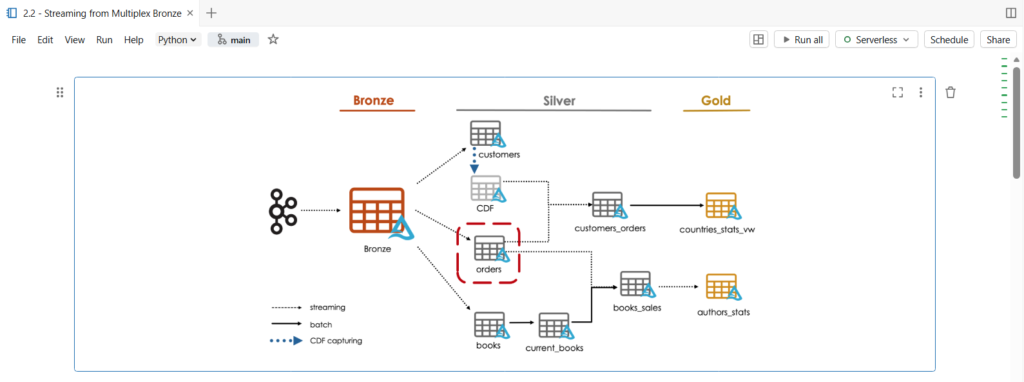
In this notebook, we are going to parse raw data from a single topic in our multiplexer bronze table.
As you can see, in our architecture diagram, we will create the orders silver table.
Let us start by copying our dataset files.

Before starting, we need to cast our Kafka binary fields as strings.
%sql

SELECT cast(key AS STRING), cast(value AS STRING)
FROM bronze
LIMIT 20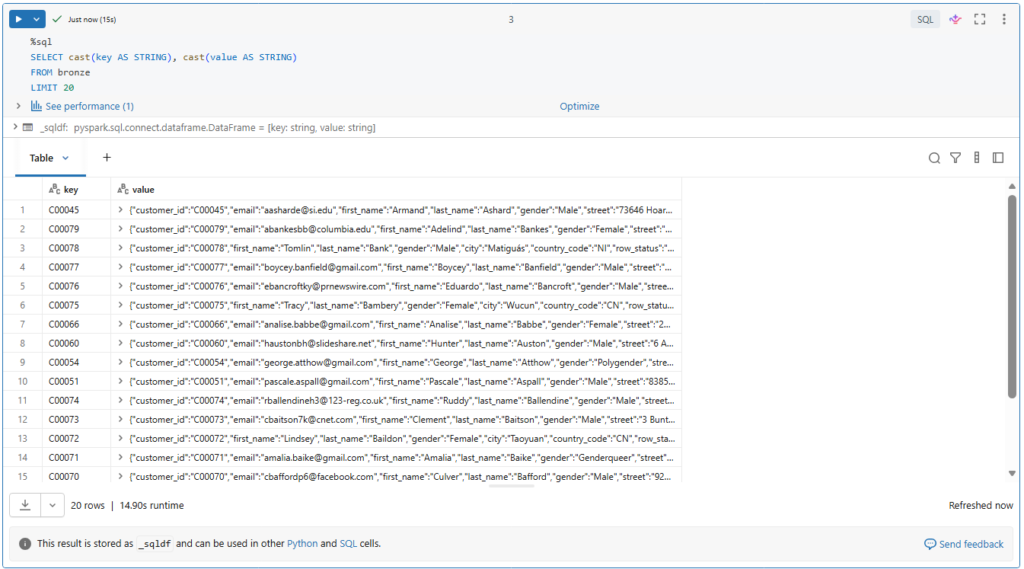
Here we see the value fields in JSON format.
Let us try to process this data.
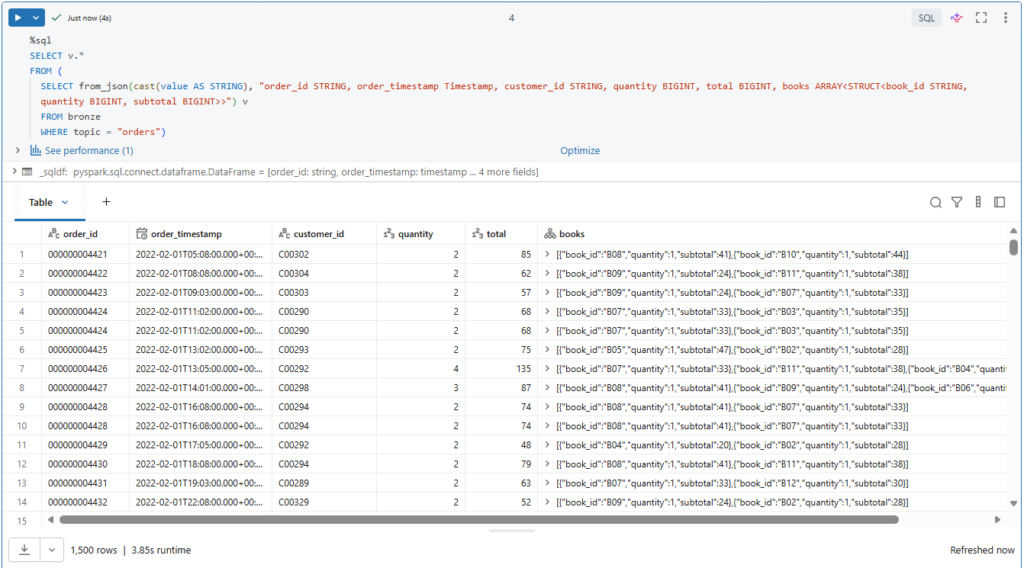
We can parse the orders data using from_json() function.
%sql
SELECT v.*
FROM (
  SELECT from_json(cast(value AS STRING), "order_id STRING, order_timestamp Timestamp, customer_id STRING, quantity BIGINT, total BIGINT, books ARRAY<STRUCT<book_id STRING, quantity BIGINT, subtotal BIGINT>>") v
  FROM bronze
  WHERE topic = "orders")
For this, we need to provide the schema description.
Let us run this query.
Let us now convert this logic to a streaming read.
First, we need to convert our static table into a streaming temporary view.
(spark.readStream
      .table("bronze")
      .createOrReplaceTempView("bronze_tmp"))
This allows us to write streaming queries with Spark SQL.
Next, we can update our above query to refer to this streaming temporary view.
# Explicitly set the checkpoint location for streaming display, as implicit temporary checkpoint locations are not supported in the current workspace.

orders_silver_df = spark.sql("""
    SELECT v.*
    FROM (
    SELECT from_json(cast(value AS STRING), "order_id STRING, order_timestamp Timestamp, customer_id STRING, quantity BIGINT, total BIGINT, books ARRAY<STRUCT<book_id STRING, quantity BIGINT, subtotal BIGINT>>") v
    FROM bronze_tmp
    WHERE topic = "orders")
""")

display(orders_silver_df, checkpointLocation = f"{bookstore.checkpoint_path}/tmp/orders_silver_{time.time()}")
Remember, such an always-on stream prevents the cluster from auto terminating.
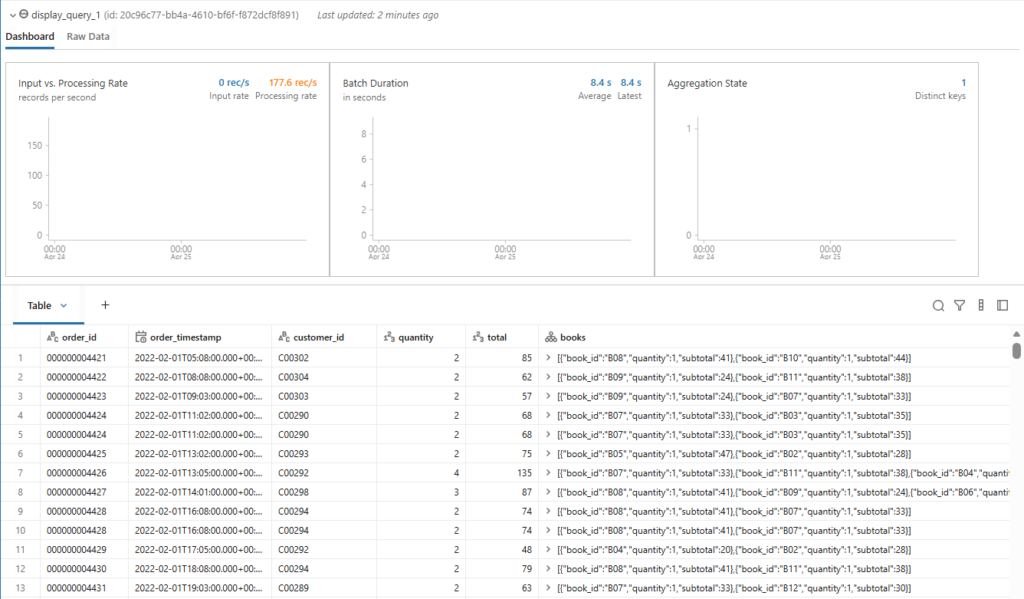
For now, let us stop this streaming query by clicking the Cancel link.
Let us define this logic in a temporary view to pass it back to Python.
%sql
CREATE OR REPLACE TEMPORARY VIEW orders_silver_tmp AS
  SELECT v.*
  FROM (
    SELECT from_json(cast(value AS STRING), "order_id STRING, order_timestamp Timestamp, customer_id STRING, quantity BIGINT, total BIGINT, books ARRAY<STRUCT<book_id STRING, quantity BIGINT, subtotal BIGINT>>") v
    FROM bronze_tmp
    WHERE topic = "orders")
Remember, we can switch from SQL to Python using a temporary view.
This temporary view used as intermediary to capture the query we want to apply.
Now, we can create our orders silver table.
query = (spark.table("orders_silver_tmp")
               .writeStream
               .option("checkpointLocation", f"{bookstore.checkpoint_path}/orders_silver")
               .trigger(availableNow=True)
               .table("orders_silver"))

query.awaitTermination()
Simply we use a streaming write to persist the result of our streaming temporary view to disk.
Notice that we are using the trigger availableNow option, so all records will be processed in multiple microbatches until no more data is available and then stop the stream.

You may wondering, couldn’t we express this entire logic using pyspark dataframe API?
Yes, of course we can.
from pyspark.sql import functions as F

json_schema = "order_id STRING, order_timestamp Timestamp, customer_id STRING, quantity BIGINT, total BIGINT, books ARRAY<STRUCT<book_id STRING, quantity BIGINT, subtotal BIGINT>>"

query = (spark.readStream.table("bronze")
        .filter("topic = 'orders'")
        .select(F.from_json(F.col("value").cast("string"), json_schema).alias("v"))
        .select("v.*")
     .writeStream
        .option("checkpointLocation", f"{bookstore.checkpoint_path}/orders_silver")
        .trigger(availableNow=True)
        .table("orders_silver"))

query.awaitTermination()
Here, we refactor our logic to use Python syntax instead of SQL.
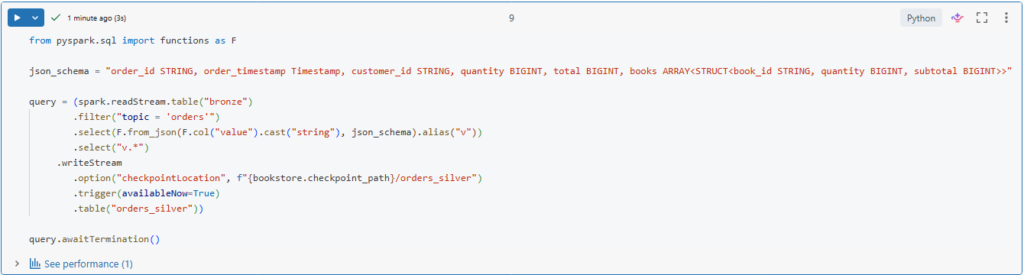
We use the filter() function to retrieve the records of the orders topic, and we use the from_json() function from the functions model in PySpark.
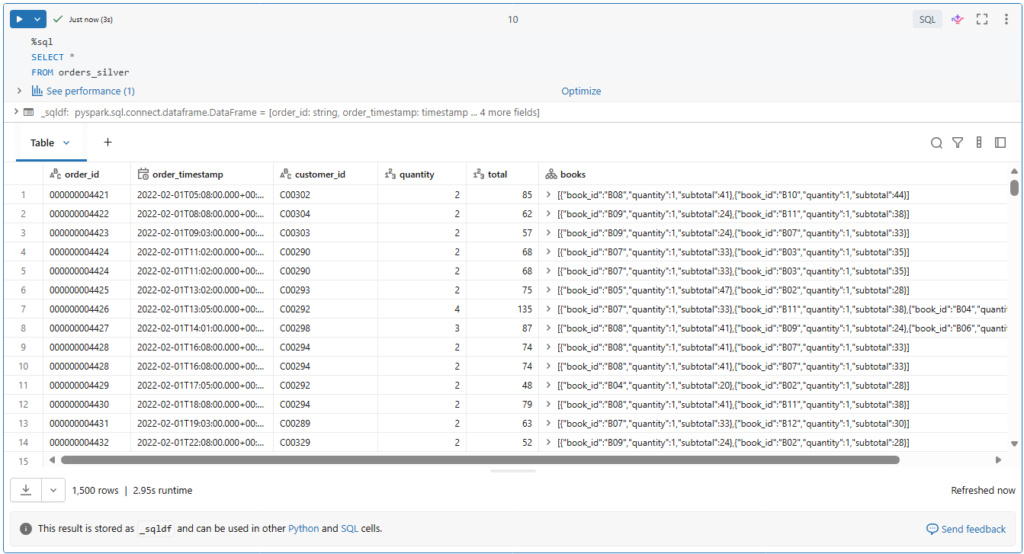
Let us now query our orders table and check the results.
%sql
SELECT *
FROM orders_silver
As you can see, our orders records have been successfully processed from the multiplex bronze table into our orders silver table.
Quality Enforcement (Hands On)
We are going to see how to add check constraints to delta tables to ensure the quality of our data.
Table constraints apply boolean filters to columns and prevent data violating these constraints from being written.
Constraints on existing delta tables
We can define constraints on existing delta tables using ALTER TABLE _ ADD CONSTRAINT command.
Here we specify a human readable name for the constraint.
%sql
ALTER TABLE orders_silver ADD CONSTRAINT timestamp_within_range CHECK (order_timestamp >= '2020-01-01');
In our case, timestamp_within_range.
Following by a boolean condition to be checked.
Also notice that the condition of a check constraint looks like a standard WHERE clause you might use in a SELECT statement.
Let us run this.

Table constraints are listed under the properties of the extended table description.
%sql
DESCRIBE EXTENDED orders_silver
Let us confirm this.
If we scroll down, we can see our table constraints in the Table Properties field.
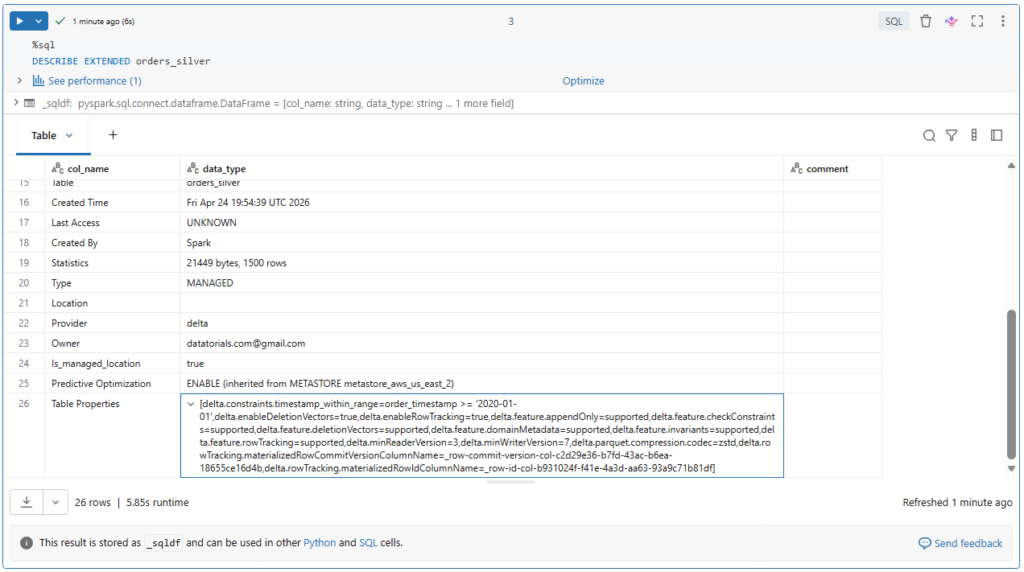
Here we can see both the name and the actual condition of our check constraints.
Now let us see what will happen if we attempt to insert new records, where one of them, for example, violate the table constraint.
%sql
INSERT INTO orders_silver
VALUES ('1', '2022-02-01 00:00:00.000', 'C00001', 0, 0, NULL),
       ('2', '2019-05-01 00:00:00.000', 'C00001', 0, 0, NULL),
       ('3', '2023-01-01 00:00:00.000', 'C00001', 0, 0, NULL)
Here.
The second record has a timestamp of 2019, which violates our check constraint condition.
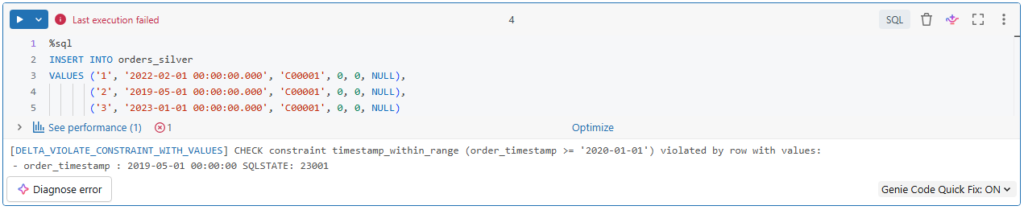
As you can see, the write operation failed because of the constraint violation.
Note that ACID guarantees on Delta Lake ensure that all transactions are atomic. That is, they will either succeed or fail completely.
So here, none of these records have been inserted, even the ones that don’t violate our constraints.
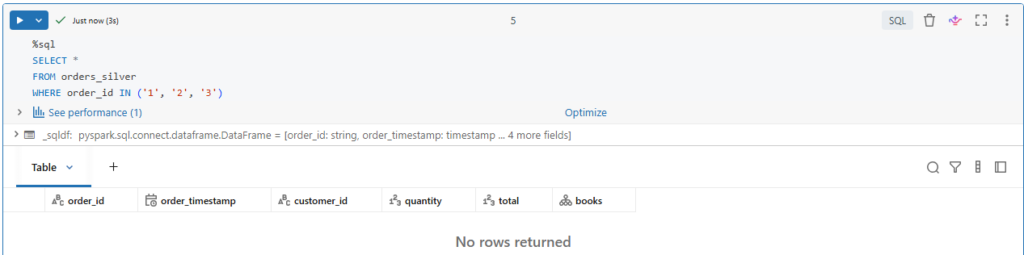
Let us confirm this.
%sql
SELECT *
FROM orders_silver
WHERE order_id IN ('1', '2', '3')
Indeed, none of these records have been inserted into our table.
Let us add another constraint.
In our dataset, we know that some bad orders are sent, by error, with a quantity of zero items.
So, we are adding a check that quantity must be greater than zero.
%sql
ALTER TABLE orders_silver ADD CONSTRAINT valid_quantity CHECK (quantity > 0);
Let us run this command and see what will happen.

Interesting!
The command failed with this error that says some rows in the table violate the new CHECK constraint.
In fact, ADD CONSTRAINT command verifies that all existing rows satisfy the constraint before adding it to the table.
It makes sense, right?
Let us explore our table properties.
%sql
DESCRIBE EXTENDED orders_silver
As expected, the new constraint has not been added to our table.
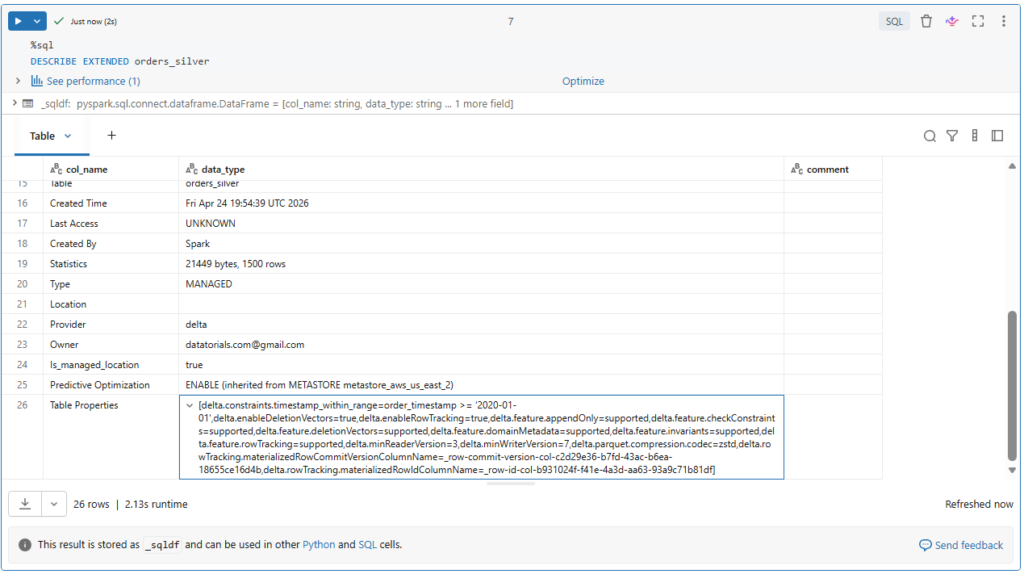
So, you must ensure that no data violating the constraint is already in the table prior to defining the constraint.
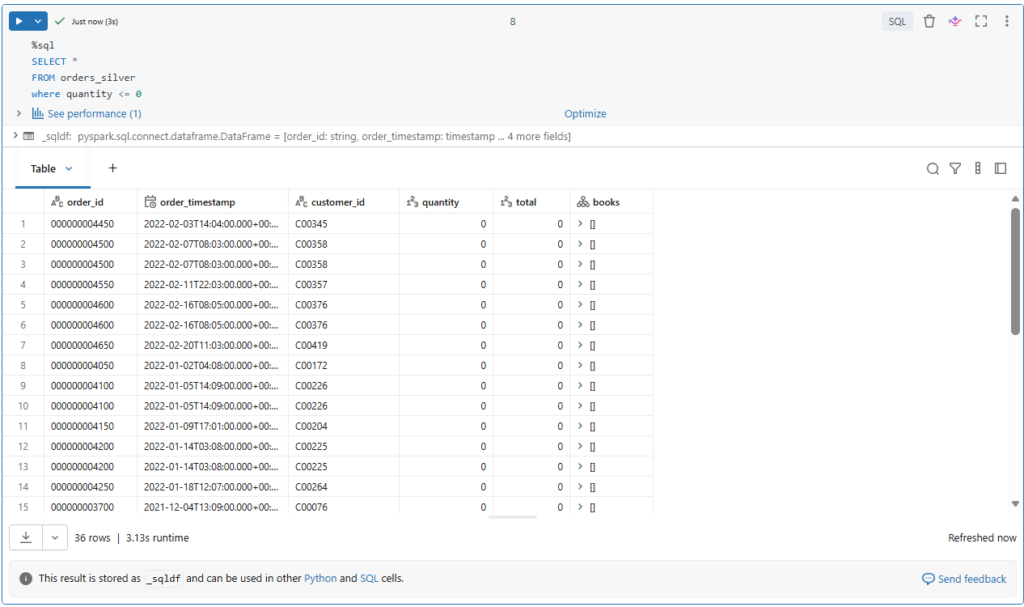
Let us take a look on our table’s data.
%sql
SELECT *
FROM orders_silver
where quantity <= 0
Indeed, we have 36 orders of zero items.
But the question, how do we deal with this?
We could, for example, manually delete the bad records and then set the CHECK constraint.
Or, set the CHECK constraint before processing data from our bronze table.
However, as we saw with the above timestamp constraint, if a batch of data contains records that violate the constraint, the job will fail and throw an error.
If our goal is to exclude bad records but keep streaming jobs running, we will need a different solution.
We could separate such bad records into a quarantine table, for example.
Or, simply filter them out before writing the data into the table.
So, if we recall our logic, we can simply add a filter condition on the quantity field.
from pyspark.sql import functions as F

json_schema = "order_id STRING, order_timestamp Timestamp, customer_id STRING, quantity BIGINT, total BIGINT, books ARRAY<STRUCT<book_id STRING, quantity BIGINT, subtotal BIGINT>>"

query = (spark.readStream.table("bronze")
        .filter("topic = 'orders'")
        .select(F.from_json(F.col("value").cast("string"), json_schema).alias("v"))
        .select("v.*")
        .filter("quantity > 0")
     .writeStream
        .option("checkpointLocation", f"{bookstore.checkpoint_path}/orders_silver")
        .trigger(availableNow=True)
        .table("orders_silver"))

query.awaitTermination()
Lastly.
If we need to remove a constraint from a table, we use a DROP CONSTRAINT command.
%sql
ALTER TABLE orders_silver DROP CONSTRAINT timestamp_within_range;
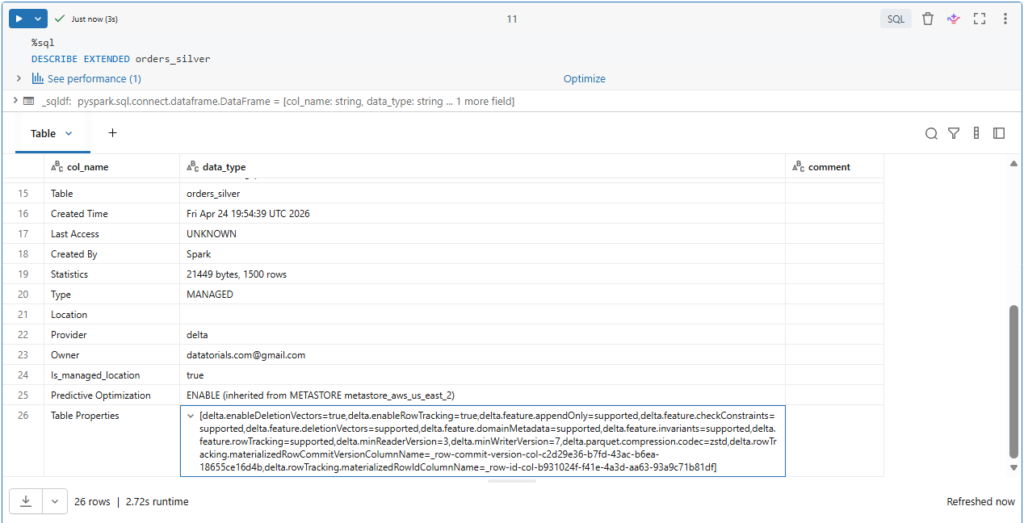
Let us check our table description to confirm this.
%sql
DESCRIBE EXTENDED orders_silver
Indeed, the constraint is no more under the table of properties.
We will continue adding more transformations to our orders table.
Streaming Deduplication (Hands On)
Many source systems like Kafka introduce duplicate records.
We will see how to eliminate the duplicate records while working with structured streaming.
We will continue working on our orders silver table So, we will apply deduplication at the Silver-level rather than the Bronze-level.
Remember, the bronze table should retain a history of the true state of our streaming source.
This prevents potential data loss due to applying aggressive equality enforcement and pre-processing at the initial ingestion and also helps minimizing latencies for data ingestion.
Before starting, let us identify the current number of records in our orders topic of the bronze table.
(spark.read
      .table("bronze")
      .filter("topic = 'orders'")
      .count()
)
For now, we will read our table using the read() method and not the readStream() method.
Currently we have 1500 records.

With the static data, we can simply use dropDuplicates() function to eliminate duplicate records.
from pyspark.sql import functions as F

json_schema = "order_id STRING, order_timestamp Timestamp, customer_id STRING, quantity BIGINT, total BIGINT, books ARRAY<STRUCT<book_id STRING, quantity BIGINT, subtotal BIGINT>>"

batch_total = (spark.read
                      .table("bronze")
                      .filter("topic = 'orders'")
                      .select(F.from_json(F.col("value").cast("string"), json_schema).alias("v"))
                      .select("v.*")
                      .dropDuplicates(["order_id", "order_timestamp"])
                      .count()
                )

print(batch_total)
Let us run this.
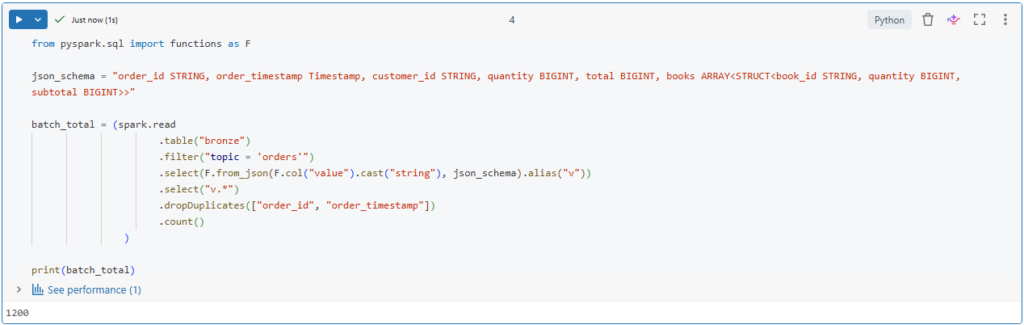
Interesting!
It appears that 300 our records are duplicates.
In Spark structured streaming, we can also use the dropDuplicates() function.
Structured streaming can track state information for the unique keys in the data.
This ensures that duplicate records do not exist within or between microbatches.
However, over time, this state information will scale to represent all history.
We can limit the amount of the state to be maintained by using Watermarking.
deduped_df = (spark.readStream
                   .table("bronze")
                   .filter("topic = 'orders'")
                   .select(F.from_json(F.col("value").cast("string"), json_schema).alias("v"))
                   .select("v.*")
                   .withWatermark("order_timestamp", "30 seconds")
                   .dropDuplicates(["order_id", "order_timestamp"]))
What is Watermarking?
Watermarking allows to only track state information for a window of time in which we expect records could be delayed.
Here we define a watermark of 30 seconds.

In this way, we are sure that there are no duplicate records exist in each new microbatches to be processed.
However, when dealing with streaming duplication, there is another level of complexity compared to static data as each micro-batch is processed.
We need also to ensure that records to be inserted are not already in the target table.
We can achieve this using insert-only merge.
def upsert_data(microBatchDF, batch):
    microBatchDF.createOrReplaceTempView("orders_microbatch")

    sql_query = """
      MERGE INTO orders_silver a
      USING orders_microbatch b
      ON a.order_id=b.order_id AND a.order_timestamp=b.order_timestamp
      WHEN NOT MATCHED THEN INSERT *
    """

    microBatchDF.sparkSession.sql(sql_query)
    #microBatchDF._jdf.sparkSession().sql(sql_query)
This operation is ideal for deduplication.
It defines logic to match on unique keys and only insert those records for keys that do not exist in the table.
Here, we define a function to be called at each new micro batch processing.
We will see in a minute how to use this function in a streaming write query.
In this function, we first store the records we inserted into a temporary view called orders_microbatch.
We then use this temporary view in our insert-only merge query.
Lastly, we execute this query using spark SQL function.
However, in this particular case, the spark session cannot be accessed from within the microbatch process.
Instead, we can access the local spark session from the microbatch data frame.
Here we are using a cluster with runtime 11.4 LTS.
Notice that for clusters with runtime version below 10.5, the syntax to access the local spark session is slightly different.
Now, in order to code the upsert function in our stream, we need to use the foreachBatch method.
query = (deduped_df.writeStream
                   .foreachBatch(upsert_data)
                   .option("checkpointLocation", f"{bookstore.checkpoint_path}/orders_silver")
                   .trigger(availableNow=True)
                   .start())

query.awaitTermination()
This provides the option to execute custom data writing logic on each micro batch of a streaming data.
In our case, this custom logic is the insert-only merge for deduplication.
Let us run our streaming query and wait for its termination.
Notice here that we are indeed applying the merge operation.
Let us see the number of entries that have been processed into the orders_silver table.
streaming_total = spark.read.table("orders_silver").count()

print(f"batch total: {batch_total}")
print(f"streaming total: {streaming_total}")
Indeed, the number of unique records match between our batch and streaming deduplication queries.
