We are going to see how to use CDF data to propagate changes to downstream tables.
For this demo, we will create a new silver table called customers_orders by joining two streams:
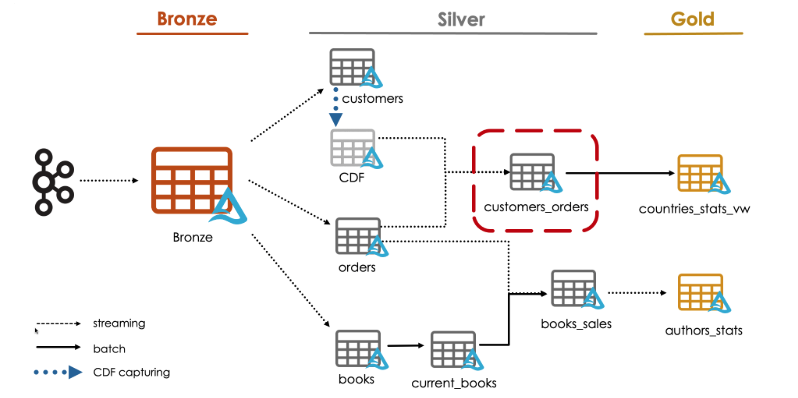
The orders table with the CDF data of the customers table.
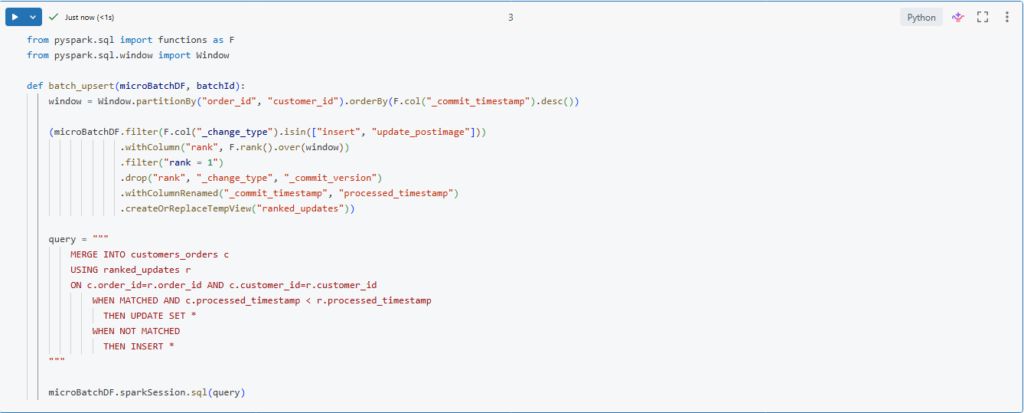
We will start by creating a function to upsert ranked updates into our new table.
from pyspark.sql import functions as F
from pyspark.sql.window import Window

def batch_upsert(microBatchDF, batchId):
    window = Window.partitionBy("order_id", "customer_id").orderBy(F.col("_commit_timestamp").desc())

    (microBatchDF.filter(F.col("_change_type").isin(["insert", "update_postimage"]))
                 .withColumn("rank", F.rank().over(window))
                 .filter("rank = 1")
                 .drop("rank", "_change_type", "_commit_version")
                 .withColumnRenamed("_commit_timestamp", "processed_timestamp")
                 .createOrReplaceTempView("ranked_updates"))

    query = """
        MERGE INTO customers_orders c
        USING ranked_updates r
        ON c.order_id=r.order_id AND c.customer_id=r.customer_id
            WHEN MATCHED AND c.processed_timestamp < r.processed_timestamp
              THEN UPDATE SET *
            WHEN NOT MATCHED
              THEN INSERT *
    """

    microBatchDF.sparkSession.sql(query)
We will use the same logic we used before for CDC feed processing in a previous lecture.
Here, In order to get the new changes we are filtering for to change types: insert and update_postimage.
(microBatchDF.filter(F.col(“_change_type”).isin([“insert”, “update_postimage”]))
We are using the _commit_timestamp column to sort the records in the window.
.orderBy(F.col(“_commit_timestamp”).desc())
Also notice here that we are using a composite key for partitioning the window and for merging our updates as well.
.partitionBy(“order_id”, “customer_id”)
Let us run this cell to create the function.
Next, we will define our new table.
%sql
CREATE TABLE IF NOT EXISTS customers_orders
(order_id STRING, order_timestamp Timestamp, customer_id STRING, quantity BIGINT, total BIGINT, books ARRAY<STRUCT<book_id STRING, quantity BIGINT, subtotal BIGINT>>, email STRING, first_name STRING, last_name STRING, gender STRING, street STRING, city STRING, country STRING, row_time TIMESTAMP, processed_timestamp TIMESTAMP)
Now, we can define our streaming query to write our new table customers_orders.
def process_customers_orders():
    orders_df = spark.readStream.table("orders_silver")

    cdf_customers_df = (spark.readStream
                             .option("readChangeData", True)
                             .option("startingVersion", 2)
                             .table("customers_silver")
                       )

    query = (orders_df
                .join(cdf_customers_df, ["customer_id"], "inner")
                .writeStream
                    .foreachBatch(batch_upsert)
                    .option("checkpointLocation", f"{bookstore.checkpoint_path}/customers_orders")
                    .trigger(availableNow=True)
                    .start()
            )

    query.awaitTermination()

process_customers_orders()
Here we are performing a join operation between two streaming tables.
.join(cdf_customers_df, [“customer_id”], “inner”)
We start by reading the orders table as a streaming source, and reading the customers data as a streaming source as well.
Then, we are performing inner join between these two data frames based on the customer_id key.
When performing stream-stream join Spark buffers past input as streaming state for both input streams, so that it can match every future input with past inputs and accordingly generate the joined results.
Similar to streaming duplication we saw before, we can limit the state using watermarks.
Let us now run this to process the records using our foreachBatch logic.
Let us review the data written in our table.
%sql
SELECT * FROM customers_orders
We successfully processed records.
We can now land a new data file and process it to see how all our changes will be propagated through our pipeline.
bookstore.load_new_data()
bookstore.process_bronze()
bookstore.process_orders_silver()
bookstore.process_customers_silver()
process_customers_orders()
Let us now confirm the results. Indeed, new updates have been propagated from the bronze table and merged into our new silver table.
Stream Static Joins
Now we will learn how streaming static join works and we will understand its potential limitations.
Stream Vs Static Tables
In Spark Structured Streaming or incremental tables or streaming tables are append-only data sources. So data can only be appended in these tables.
While static tables typically contain data that may be updated, deleted or overwritten. Such data sources are not streamable because they break the above append-only requirements of streaming sources.
To better understand how stream-static join works, here is an illustration showing a streaming table.
Students and a static table Courses.
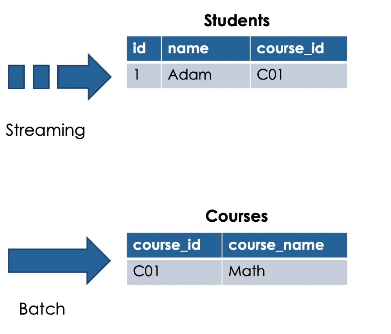
When performing stream-static join, the resulting table is an incremental table.
Here we see the result of performing inner join between students and courses based on the course_id.
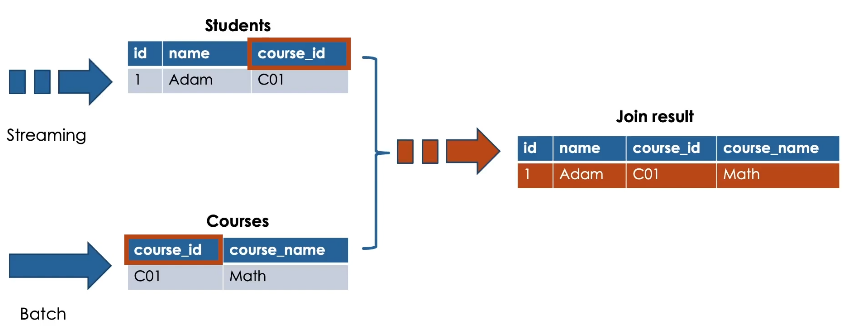
Guarantee: latest version of static table
This pattern will take advantage of Delta Lake’s guarantee that the latest version of the static Delta table is returned each time it is queried.
Streaming drives the join
In stream-static join, the streaming portion of the join drives the join process.
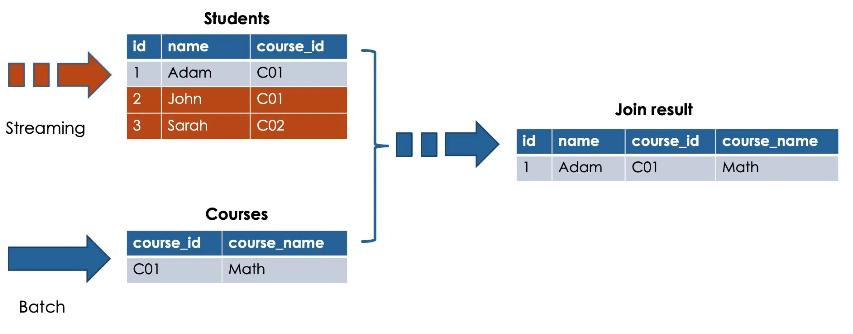
Only new data appearing on the streaming side of the join will trigger the processing.
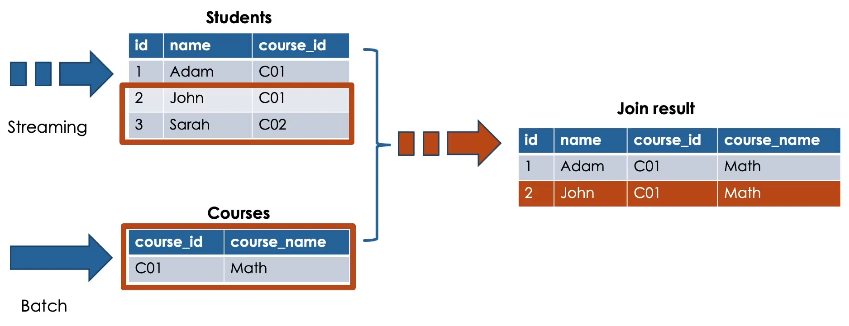
While adding new records into the static table, will not automatically trigger updates to the result of the stream-static join.
So, nothing will happen in this case.
In a stream-static joins only matched records at the time the stream is processed will be presented in the resulting table. This means unmatched records at the time the stream is processed like the record number 5 will be missed from the resulting table.
But the question now, can we buffer these unmatched records as a streaming state to be matched later?
The answer is no.
Streaming static joins are not stateful. Meaning that we cannot configure our query to wait for new records to appear in the static side, prior to calculating the results.
So when leveraging streaming static joins, make sure to be aware of these limitations for unmatched records.
For this, you can configure a separate batch job to find and insert these missed records.
Hands On
We are going to see how to join a stream with a static dataset.
For this demo, we will create the silver table books_sales by joining the orders streaming table with the current_books, static Table.
Here.
Our current_books table is no longer streamable.
Remember this table is updated using batch overwrite logic so it breaks the requirement of an ever appending source for structured streaming.
Fortunately, Delta Lake guarantees that the latest version of a static table is returned each time
It is queried in a streaming static join.
Let us write our streaming query.
Here, we read our orders table as a streaming source using spark.readStream while we read the
current_books static table using spark.read
Now, we can simply join the two data frames as usual.
Lastly, we run a trigger available now batch to process the data and write a stream in append mode.
Let us run this cell to create and run this function.
Let us now review the data written in our new table.
Here is the result of our streaming static join.
Let us see how many records written in this table.
Currently we have about 3500 records.
Remember when performing a stream-static join, the streaming portion of the join drives this join process.
So only new data appearing on the streaming side of the query will trigger the processing.
And we are guaranteed to get the latest version of the static table during each microbatch transaction.
Let us try to demonstrate this.
Here we will land a new data file in our dataset source directory and propagate the data only to the static table.
If we check the number of the records again.
We see that we still have the same number of records.
This confirms that our streaming static join didn’t trigger by only appending data to the static table.
Now let us propagate our new data to the orders streaming table and re-execute our stream-static join
If we check the number of records one more time.
Indeed our stream-static join has been triggered this time by the new data appended to the streaming table.
And as you can see now, we have more records in our resulting table.